
Frequently asked questions
Straight answers about how Billing for Mosdos works today. Something missing? Ask us.
Who owns our data? Can we take it with us?
Your records belong to your organisation. Any login can download lists as CSV (parents, children, transactions, auto-debits and the change log) under Settings › Tools & data › Export. Your organisation's admin can also download a full backup there: one file with every record of the organisation, including notes, follow-ups, payment history, settings and uploaded files. If you leave, we give you a full export and then delete your data as the Privacy Policy says.
How is our data kept safe?
Everything travels over HTTPS and is encrypted at rest by our hosting provider; the database is stored in Western Europe. Passwords are kept only as salted hashes. Each organisation's data is separate, each login opens only its own organisations, and admins choose what every login can do (for example read-only). Changes are recorded in a change log. The whole database is backed up every day and before every update. Backups reduce the risk of losing data, but no system can remove it completely.
Can you see our clients' details?
Inside the app, not unless your admin gives access under Settings › People & access › Privacy, for a set time or until taken back. Its use is recorded in a log you can see, and you can take it back at any time. The people who run the service can reach the database and backups through the hosting provider when running the service needs it (for example to restore a backup); the Privacy Policy explains exactly when.
What counts as a client?
One family, member or donor: the top-level record with one balance and one statement. Children, pledges and family members under it don't count, and nor do clients you have moved to History. The plan's limit is for all your organisations together. Going over it only shows an "upgrade needed" note: nothing is deleted or locked.
Can we run more than one organisation?
Yes, on Standard (up to 3) and Pro (up to 10). Each organisation has its own clients, settings and statements, and one login switches between them. Standard and Pro can also keep a linked account inside an organisation, for example a second branch or fund, and move clients into it with Split.
Does the app take money from parents' bank accounts?
No. Recurring fees are added to each family's account automatically, and you record or import the payments that come in. Money only moves when your organisation collects it itself, for example by standing order. On Standard and Pro you can also save a parent's card and charge it through your organisation's own Stripe account: you paste your Stripe key once, and nothing is charged unless you press Charge or set a card schedule.
How much do texts cost?
Standard includes £10 of texts a month and Pro £25, shared by all your organisations; you can top up by card. A short text in English counts once (about 4.4p); a longer text, or one in Hebrew or Yiddish, counts as two or more. The app shows the estimated cost before anything is sent, and texts stop at the allowance until you top up or the next month starts. Texts and emails are off until your organisation switches them on.
What does it cost during the beta?
When you sign up online you pay the published price by card, monthly or yearly (a year costs 10 months), and you can cancel any time under Plan & accounts › Manage billing; the plan then runs to the end of the period you paid for. Organisations that joined in the early beta had their terms agreed individually. See the plans and the Terms.
Which languages does it speak?
The app is in English or Hebrew (עברית), laid out right to left in Hebrew. The guide is in English, Yiddish and Hebrew, and statements show the English date and the parsha, with an optional Hebrew date column.
We use spreadsheets today. How do we switch?
Fill in the client template and import everyone at once (New clients from the template), import payments from your bank file with duplicate checks (Checking an import), and bring in past years from your old program and check them against its balances (History from the old program). On Pro, we do the setup and data migration for you.
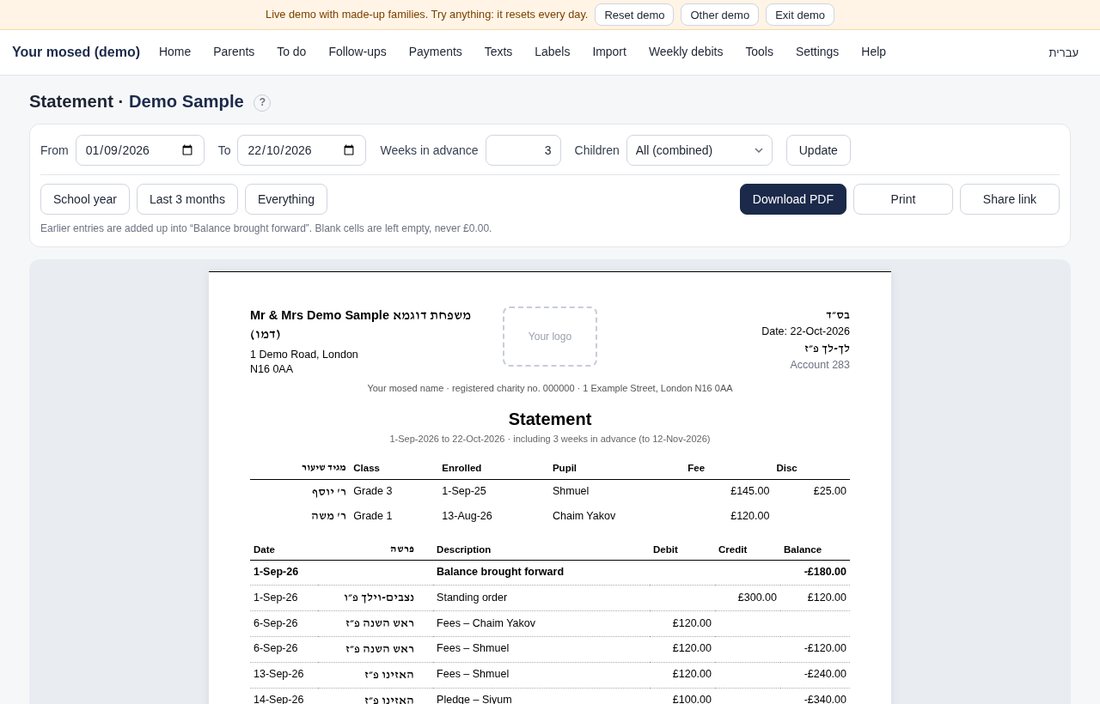
What does a statement look like?
Here is one from the demo, with made-up data. You can also open the live demo and download any family's statement as a PDF.
How do we get help?
Email admin@billingformosdos.com or use the contact form. Support is by email; Pro includes priority support. The guide explains every screen.